Home
Home

CMS App Design
CMS App Design
ROLE
ROLE
UI UX Designer
Research
UI UX Designer
Research
TIMELINE
TIMELINE
1 month
1 month
May 2024
May 2024
SKILLS
SKILLS
Research
Research
UI Design
UI Design
Prototyping
Prototyping
SUMMARY
SUMMARY
This project focuses on developing an all-in-one academic management app that combines assignments, schedules, attendance, and grades into a single, user-friendly platform. It aims to simplify educational tasks, reduce stress, and support academic success. By prioritizing efficiency and ease of use, the app is designed to empower students to manage their studies more effectively and reach their educational goals.
This project centers on creating an all-in-one academic management app that brings together assignments, schedules, attendance, and grades into one platform. The goal was to simplify student workflows, reduce stress, and support academic success. By focusing on efficiency and ease of use, the app empowers students to manage their studies more effectively and stay on track with their educational goals.
PROBLEM STATEMENT
PROBLEM STATEMENT
Students who needs to manage their academic information on a single platform, because they are not able to save the important information or calculate attendance for future leaves across more than one platforms.
The current system of managing academic information through google drive, keep, calendar & CMS app is inefficient and lacks leave calculator, centralized communication, important information saving, hindering effective learning for both undergraduate & post - graduate students.
Students currently manage their academic information across multiple platforms like Google Drive, Keep, Calendar, and their institution’s CMS app. This fragmented system makes it difficult to save important information, calculate attendance for future leaves, or access everything in one place. The lack of a centralized and efficient solution hinders effective learning and organization for both undergraduate and postgraduate students.
TARGET AUDIENCE
TARGET AUDIENCE
Our app is designed for college students aged 18-30 who are looking for an easier way to organize their academic life. This includes undergraduates and postgraduates. By focusing on this audience, we aim to address their specific challenges in managing multiple educational tasks and systems.
Our app is designed for college students aged 18–30 who are looking for an easier way to organize their academic life. This includes both undergraduates and postgraduates. By focusing on this audience, we aim to address their specific challenges in managing multiple educational tasks and systems.

USER RESEARCH
USER RESEARCH
In order to understand the problem deeply we conducted research on our target group. For this research we choose qualitative and quantitative method. In which conducted questionnaire survey and secondary research as well. Once we identified the problem and decided to address it, we conducted comprehensive research to understand our user demographic. Our research comprised two main approaches: quantitative and qualitative.
In order to understand the problem deeply, we conducted research on our target group using both qualitative and quantitative methods. This included a questionnaire survey as well as secondary research. Once we identified the problem, we carried out comprehensive research to understand our user demographic in detail.
Quantitive Method
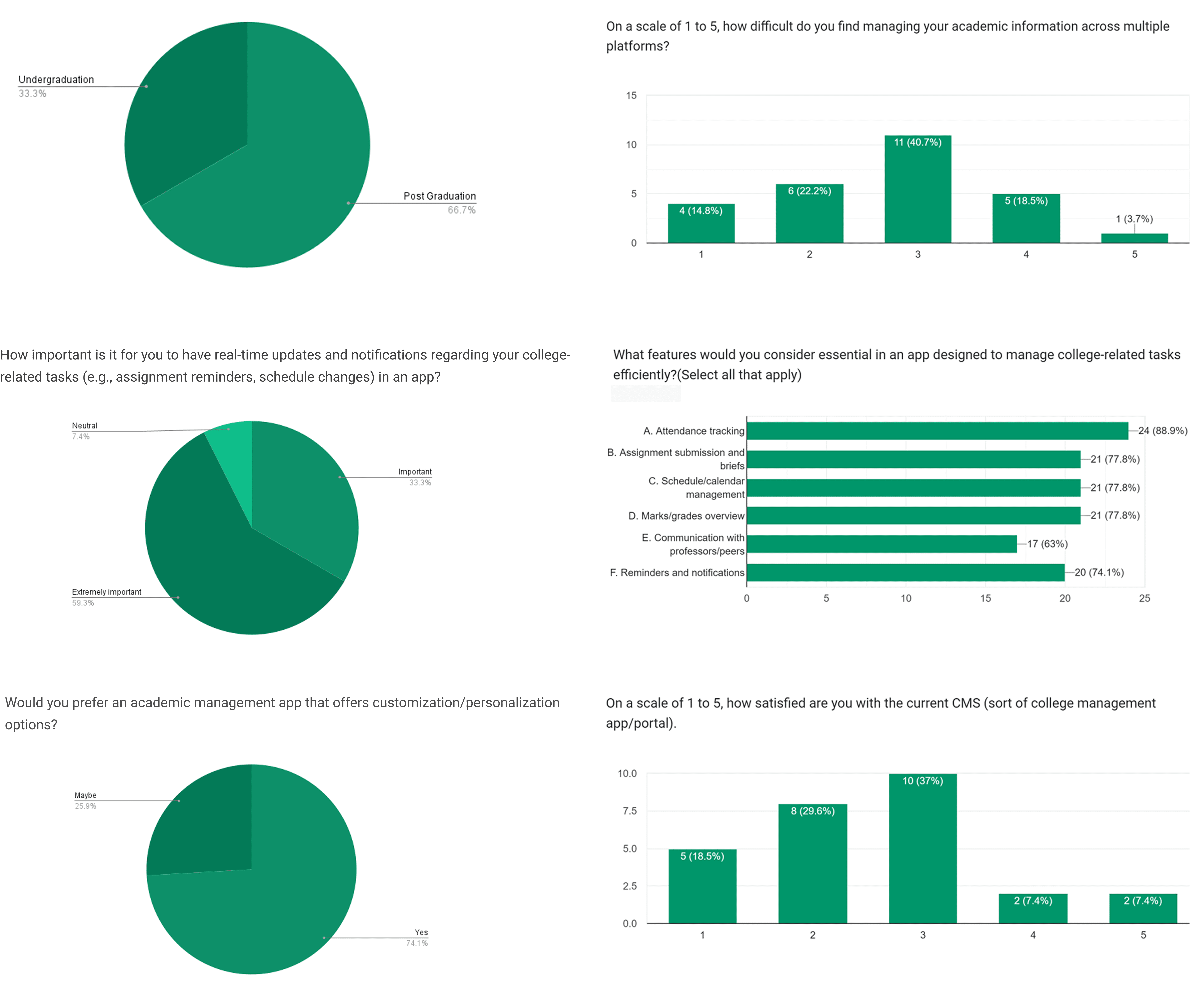
Our survey, which included both undergraduate (33.3%) and postgraduate (66.7%) students, revealed that most found managing academic information across multiple platforms moderately challenging, with over 40% rating the difficulty at 3 out of 5. Students considered attendance tracking (88.9%), assignment submission, schedule management, and marks/grades overview (all at 77.8%) as the most essential features for an academic management app, followed by reminders and notifications (74.1%). An overwhelming 92.6% of respondents felt it was essential or important to have a unified app for all academic needs. Satisfaction with the current CMS was generally low, with most responses clustering around 2 or 3 out of 5, confirming the need for a more efficient, feature-complete solution.
Quantitive Method
Our survey, which included both undergraduate (33.3%) and postgraduate (66.7%) students, revealed that most found managing academic information across multiple platforms moderately challenging, with over 40% rating the difficulty at 3 out of 5. Students considered attendance tracking (88.9%), assignment submission, schedule management, and marks/grades overview (all at 77.8%) as the most essential features for an academic management app, followed by reminders and notifications (74.1%). An overwhelming 92.6% of respondents felt it was essential or important to have a unified app for all academic needs. Satisfaction with the current CMS was generally low, with most responses clustering around 2 or 3 out of 5, confirming the need for a more efficient, feature-complete solution.
Qualitative Method
We heavily relied on secondary research, scouring the internet, academic journals, books, and research papers to gain insights into what a course management system (CMS) is and why it's needed.
To know more about secondary research please click here.
Qualitative Method
We relied on secondary research, reviewing online sources, academic journals, books, and research papers to gain insights into what a course management system (CMS) is and why it is needed.
To know more about secondary research please click here.
COMPETITIVE ANALYSIS
COMPETITIVE ANALYSIS
We analyzed course management systems from five different colleges to understand their strengths, gaps, and how students actually use them. Only two had a single, unified CMS app, and even in those cases, like NIFT, many essential features were still missing, forcing students and faculty to rely on multiple platforms. This showed us that even when colleges have their own CMS, they often fail to include all necessary functions in one place. It also confirmed that the challenges we faced at our own college were not unique, but part of a wider problem affecting students across many institutions.
We analyzed course management systems at five colleges to see their strengths, gaps, and actual student use. Only two had a unified CMS app, and even then, like at NIFT, many key features were missing. Students and faculty still had to use multiple platforms. This shows that even when colleges provide a CMS, it rarely includes all essential functions, confirming that the issues we faced are common across institutions.

AFFINITY DIAGRAM
AFFINITY DIAGRAM
Affinity mapping for the CMS app, focusing on student frustrations, needs/wants, motivations, and experiences, would categorize insights gathered from user research into meaningful clusters.
Affinity mapping for the CMS app organizes insights from user research into meaningful clusters, focusing on student frustrations, needs and wants, motivations and experiences.

USER PERSONAS
USER PERSONAS

EMPATHY MAPPING
EMPATHY MAPPING

USER JOURNEY MAPPING
USER JOURNEY MAPPING

USER FLOWS
USER FLOWS
1.Assignment Submission Task User Flow
1.Assignment Submission Task User Flow

2.Track the Weekly Schedule
2.Track the Weekly Schedule

3.Accessing Study Material and e-library Resources
3.Accessing Study Material and e-library Resources

INFORMATION ARCHITECTURE
INFORMATION ARCHITECTURE

SKETCHES
SKETCHES

LOW FIDELITY WIREFRAMES
LOW FIDELITY WIREFRAMES

HIGH FIDELITY WIREFRAMES
HIGH FIDELITY WIREFRAMES


NEXT PHASE
NEXT PHASE
This update will evolve the CMS into a unified platform for professors and administrators. Dedicated user roles will allow professors to manage course content and assignments with ease, while administrators retain control over user management and system settings. A streamlined, intuitive interface will ensure a smooth and efficient experience for all users.
This update will transform the CMS into a unified platform for professors and administrators. Professors can manage course content and assignments, while administrators retain control over user management and system settings. A streamlined interface will make the experience smooth and efficient for everyone.

✨WHAT I LEARNT
✨WHAT I LEARNT
This was my first full UI/UX case study, and it pushed me to understand not just how to design screens, but how to think about systems. Working with my peers was invaluable, their perspectives helped me spot gaps I would have otherwise missed. I learned how important it is to validate ideas early, keep designs flexible, and let research guide every decision.
Our professors also gave valuable feedback, such as adding dedicated portals for admins and professors, and rethinking the colour system. Instead of assigning a unique colour to every subject — which could become overwhelming as the number of subjects grew — they suggested categorising them more broadly. This made a lot of sense and taught me to think ahead about scalability in design decisions.
This was my first full UI/UX case study, and it pushed me to understand not just designing screens, but thinking about systems. Working with peers was invaluable, as their perspectives helped me spot gaps I would have missed. I learned the importance of validating ideas early, keeping designs flexible, and letting research guide every decision.
Our professors also provided feedback, such as adding dedicated portals for admins and professors, and rethinking the colour system. Instead of assigning a unique colour to every subject, which could become overwhelming, they suggested broader categorisation. This taught me to plan ahead for scalability in design decisions.